Last Updated on June 8, 2026
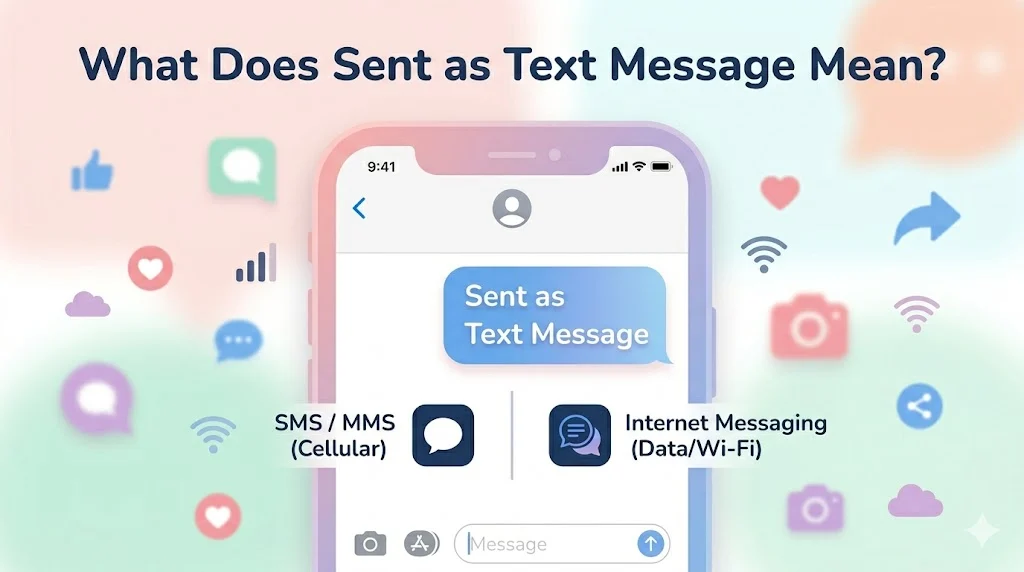
“Sent as text message” means your message was delivered using SMS (Short Message Service) instead of an internet-based messaging system like iMessage.
This typically happens when the internet connection is unavailable or the recipient cannot receive messages through the original messaging service.
You send a message from your phone expecting it to go as a normal chat then suddenly it shows “Sent as Text Message.”
If you’ve seen this notification, you might wonder: Did something go wrong? Did the other person receive my message normally? 🤔
This message simply indicates that your phone sent the message as a regular SMS instead of an internet based message service. It’s common on messaging platforms and usually happens when certain conditions change, like internet connectivity or device compatibility.
Let’s explore what “sent as text message” means, why it appears, and what it tells you about your message delivery.
Understanding the Phrase “Sent as Text Message”
Modern smartphones often use internet messaging services for faster and richer communication.
For example, phones may send messages through services like:
- iMessage
- Facebook Messenger
However, when these services are unavailable, the phone automatically switches to standard SMS texting.
When that happens, your device may display “Sent as Text Message.”
What Is a Text Message (SMS)?
A text message, technically called SMS (Short Message Service), is the traditional way phones send messages through cellular networks rather than the internet.
Key Characteristics of SMS:
- Uses mobile carrier networks
- Works without internet
- Usually limited to 160 characters
- May involve carrier charges
Unlike internet messaging, SMS does not support advanced features like typing indicators, message reactions, or read receipts.
Why Your Phone Says “Sent as Text Message”
There are several common reasons why this notification appears.
1. Internet Connection Was Unavailable
If your device temporarily loses Wi-Fi or mobile data, the messaging app may send the message as SMS instead.
Example scenario:
You’re in an area with weak internet but strong cellular signal.
Result:
The phone switches to SMS and displays “Sent as Text Message.”
2. The Recipient Isn’t Using the Same Messaging Service
Some messaging services only work between compatible devices.
For example, if someone sends a message from iMessage to a person using an Android phone, the message automatically converts to SMS.
3. Messaging Service Is Temporarily Down
Sometimes messaging platforms experience outages or temporary disruptions.
When this happens, the phone may automatically send messages using SMS to ensure delivery.
4. Messaging Settings Were Changed
Some phones allow users to enable an option like:
“Send as SMS when iMessage is unavailable.”
If enabled, the phone will automatically switch message types when needed.
Example Situations Where This Appears
Below are typical real-world scenarios.
Example 1 – Weak Internet Signal
You send a message while traveling.
Your phone shows:
“Sent as Text Message.”
Meaning:
The message was delivered using SMS instead of internet messaging.
Example 2 – Messaging Different Phone Types
If an iPhone user sends a message to an Android user, it automatically sends as SMS.
The device may show:
Sent as Text Message.
Example 3 – Temporary Network Issue
If Wi-Fi disconnects suddenly while sending a message, the phone may resend it using SMS.
📊 Message Type Comparison
| Message Type | How It Works | Internet Required | Features |
|---|---|---|---|
| SMS (Text Message) | Sent through mobile carrier | No | Basic text only |
| MMS | Carrier network | No | Supports images/media |
| Internet Messaging | Uses data/Wi-Fi | Yes | Read receipts, typing indicators |
How to Tell if Your Message Was Sent as SMS
Many phones visually indicate message type.
For example:
- SMS messages often appear green on some phones.
- Internet messages may appear blue or another color depending on the app.
This visual difference helps users quickly identify how the message was sent.
Does “Sent as Text Message” Mean the Message Failed?
No.
In fact, it usually means the opposite: your phone successfully sent the message using an alternative method.
The notification simply informs you that:
- The original messaging service was unavailable
- The phone switched to SMS automatically
So your message was still delivered.
Can You Prevent Messages from Sending as SMS?
Yes, depending on your device settings.
You can disable automatic fallback in some messaging apps.
For example, in iMessage settings, users may turn off:
“Send as SMS.”
If disabled, the phone will wait for the internet messaging service instead of sending SMS.
Advantages and Disadvantages of SMS Fallback
Advantages
- Messages still send even without internet
- Works on any phone
- Reliable in low-data areas
Disadvantages
- May incur carrier charges
- No advanced chat features
- Limited multimedia capabilities
Alternative Messaging Options
Many people prefer internet-based messaging apps because they offer additional features.
Popular options include:
- Telegram
- Signal
These platforms support:
- Voice messages
- Large file sharing
- End-to-end encryption
- Group chats
Common Misunderstandings
Here are some myths about the phrase “sent as text message.”
Myth 1: The message failed
Reality: It actually means the phone successfully sent it via SMS.
Myth 2: The recipient blocked you
Reality: This notification usually has nothing to do with blocking.
Myth 3: Your phone is malfunctioning
Reality: It’s simply a network or compatibility fallback.
FAQs
1. What does “sent as text message” mean on a phone?
It means your message was sent using SMS instead of an internet messaging service.
2. Why does my phone suddenly send text messages instead of internet messages?
This usually happens due to internet connection issues or device compatibility differences.
3. Does “sent as text message” mean I’m blocked?
No. Being blocked is unrelated to this notification.
4. Does SMS cost money?
Depending on your mobile plan, SMS messages may incur charges.
5. Why are my messages green instead of blue?
On some devices, green indicates SMS, while blue represents internet messaging.
6. Can I stop my phone from sending SMS automatically?
Yes, you can disable SMS fallback in messaging settings.
7. Will the recipient know the message was sent as SMS?
Usually they will not see that message, but they may notice the message format.
8. Is SMS still used today?
Yes. Despite internet messaging apps, SMS remains widely used because it works on any mobile phone.
Conclusion
Seeing “Sent as Text Message” simply means your phone switched from an internet-based messaging service to traditional SMS.
- It indicates SMS delivery instead of internet messaging
- Usually happens due to internet issues or device compatibility
- The message was still delivered successfully
- SMS works even without Wi-Fi or mobile data
Understanding this notification helps you recognize how your message was sent and why your phone occasionally switches messaging methods.

Sophia Bennett is a professional writer focused on explaining word meanings, expressions and everyday language in a simple and engaging way.