

Last Updated on July 4, 2026
The green dot on Snapchat is an Activity Indicator that suggests a user has been active on the app recently. It does not confirm that someone is currently online or actively chatting. Instead, it gives friends a general indication of recent activity. Users can disable the Activity Indicator through Snapchat’s Privacy Controls if they don’t want others to see this status.
If you’ve noticed a green dot on Snapchat beside someone’s profile or Bitmoji, you’re probably wondering what it actually means.
The short answer is simple.
The green dot on Snap is an Activity Indicator. It tells you that a user has been active on Snapchat recently. However, it does not mean they’re online at that exact moment.
That’s an important distinction because many people assume the green indicator works like the online status on messaging apps such as Facebook Messenger or Discord. Snapchat works differently.
Instead of showing real-time online presence, Snapchat uses the green indicator to let friends know that someone has recently opened or used the app.
Here’s a quick overview.
| Snapchat Green Dot | Meaning |
|---|---|
| Green dot visible | User was recently active on Snapchat |
| No green dot | Activity Indicator is off or no recent activity |
| Real-time online? | No |
| Shows exact last active time? | No |
| Can users disable it? | Yes |
Because Snapchat values privacy, it intentionally avoids displaying an exact “online now” label.
Why Does Snapchat Have a Green Dot?
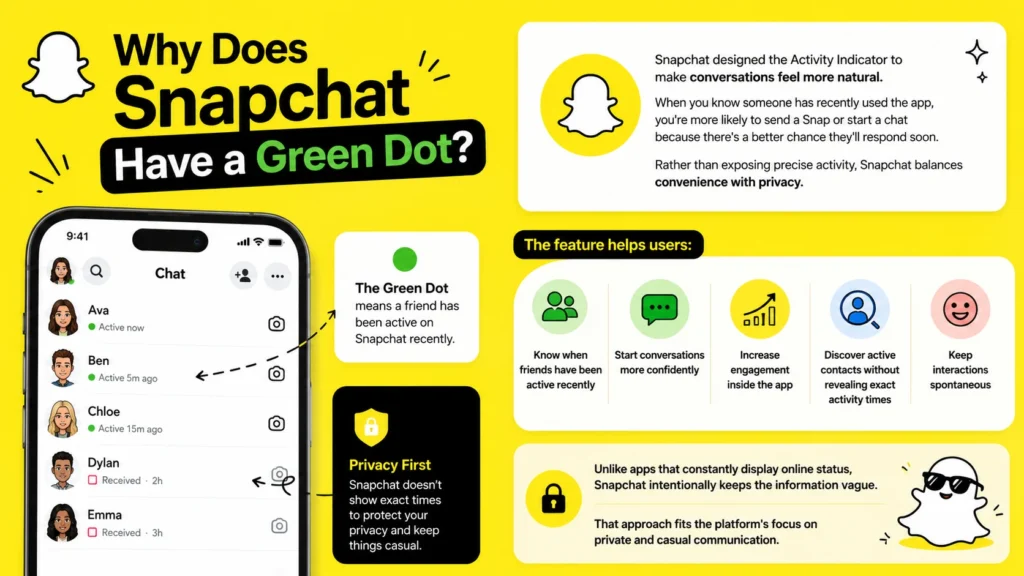
Snapchat designed the Activity Indicator to make conversations feel more natural.
When you know someone has recently used the app, you’re more likely to send a Snap or start a chat because there’s a better chance they’ll respond soon.
Rather than exposing precise activity, Snapchat balances convenience with privacy.
The feature helps users:
- Know when friends have been active recently
- Start conversations more confidently
- Increase engagement inside the app
- Discover active contacts without revealing exact activity times
- Keep interactions spontaneous
Unlike apps that constantly display online status, Snapchat intentionally keeps the information vague.
That approach fits the platform’s focus on private and casual communication.
Where Does the Green Dot Appear on Snapchat?
Many users expect the green dot to appear everywhere.
It doesn’t.
You’ll usually see the Snapchat green dot in specific places within the app.
On a User’s Profile
The most common location is beside a person’s profile information.
When you open someone’s profile, Snapchat may display a small green indicator if their Activity Indicator is enabled and they’ve recently been active.
This is the version most people notice first.
Near a Bitmoji
If someone uses a Bitmoji, the green dot may appear next to it.
Many users search for:
- What does the green dot next to someone’s Bitmoji mean?
- Green dot on Snapchat profile meaning
- Green circle on Snapchat
These all refer to the same Activity Indicator.
The Bitmoji itself isn’t creating the green dot.
It’s simply displaying the user’s activity status.
Inside Friend Recommendations
Snapchat may also show the green indicator while suggesting friends or displaying certain profile cards.
Again, this doesn’t confirm someone is actively using Snapchat right now.
It only signals recent activity.
What Does the Green Dot on Snapchat Actually Tell You?
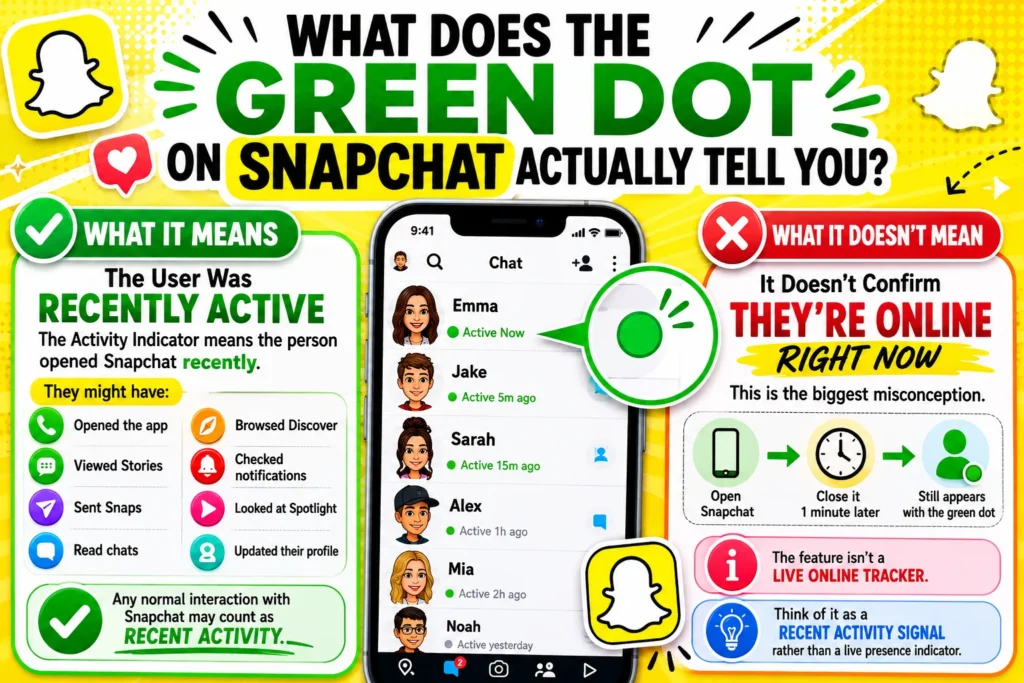
Understanding what the green dot doesn’t mean is just as important as understanding what it does.
Here’s what Snapchat is really communicating.
The User Was Recently Active
The Activity Indicator means the person opened Snapchat recently.
They might have:
- Opened the app
- Viewed Stories
- Sent Snaps
- Read chats
- Browsed Discover
- Checked notifications
- Looked at Spotlight
- Updated their profile
Any normal interaction with Snapchat may count as recent activity.
It Doesn’t Confirm They’re Online Right Now
This is the biggest misconception.
Many people think:
Green dot = Online now
That’s incorrect.
A person could:
- Open Snapchat.
- Close it one minute later.
- Still appear with the green dot for a period afterward.
The feature isn’t a live online tracker.
Think of it as a recent activity signal rather than a live presence indicator.
It Doesn’t Mean They’re Looking at Your Messages
Another common myth is that the green dot means someone is reading your chat.
It doesn’t.
Someone could be:
- Watching Stories
- Editing Memories
- Using Spotlight
- Changing settings
- Looking at Discover
- Browsing the camera
None of those actions involve your conversation.
It Doesn’t Reveal Their Last Seen Time
Snapchat intentionally avoids showing information like:
- Last online 3 minutes ago
- Active 15 minutes ago
- Online now
- Last seen yesterday
Instead, the Activity Indicator gives only a general hint.
That protects user privacy while still encouraging interaction.
Does the Green Dot Mean Someone Is Online?
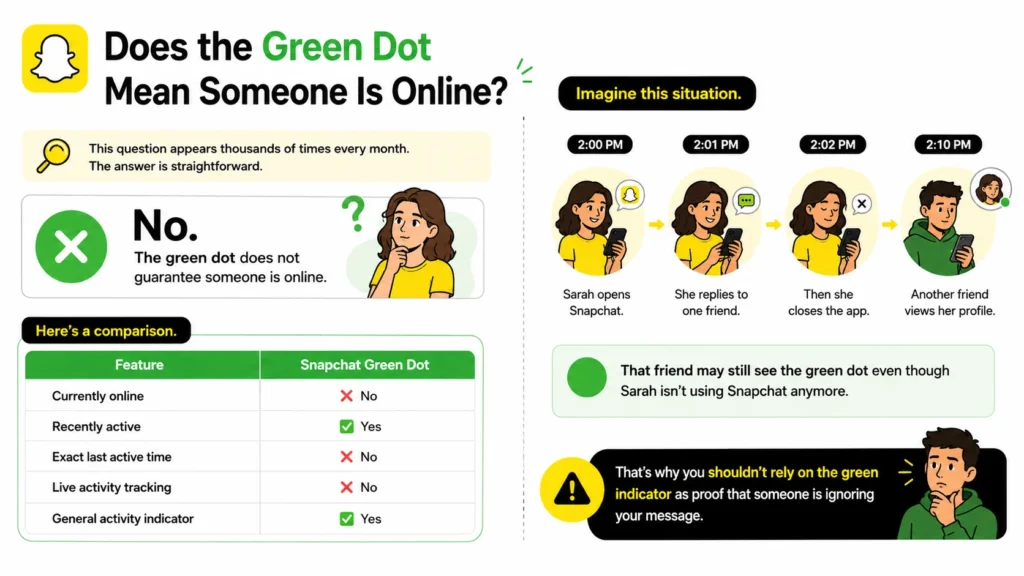
This question appears thousands of times every month.
The answer is straightforward.
No.
The green dot does not guarantee someone is online.
Here’s a comparison.
| Feature | Snapchat Green Dot |
|---|---|
| Currently online | ❌ No |
| Recently active | ✅ Yes |
| Exact last active time | ❌ No |
| Live activity tracking | ❌ No |
| General activity indicator | ✅ Yes |
Imagine this situation.
Sarah opens Snapchat at 2:00 PM.
She replies to one friend.
Then she closes the app.
At 2:10 PM, another friend views her profile.
That friend may still see the green dot even though Sarah isn’t using Snapchat anymore.
That’s why you shouldn’t rely on the green indicator as proof that someone is ignoring your message.
How Accurate Is the Snapchat Green Dot?
The Activity Indicator is generally reliable for showing recent activity, but it’s intentionally imprecise.
That’s by design.
Snapchat doesn’t want users monitoring each other’s every move.
Instead, it provides an estimate.
Here’s what you can expect.
| Activity | Accuracy |
|---|---|
| Recently used Snapchat | High |
| Online this second | Low |
| Currently typing | No indication |
| Reading your chat | No indication |
| Viewing Stories | Not specified |
Because of this design, the indicator shouldn’t be treated as a live tracking tool.
How Long Does the Green Dot Stay on Snapchat?
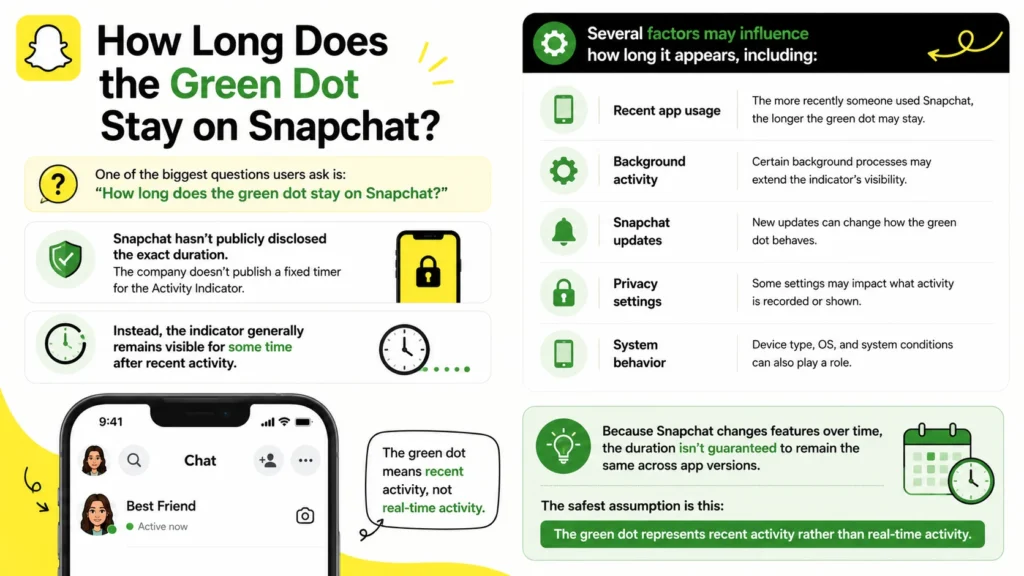
One of the biggest questions users ask is:
“How long does the green dot stay on Snapchat?”
Snapchat hasn’t publicly disclosed the exact duration.
The company doesn’t publish a fixed timer for the Activity Indicator.
Instead, the indicator generally remains visible for some time after recent activity.
Several factors may influence how long it appears, including:
- Recent app usage
- Background activity
- Snapchat updates
- Privacy settings
- System behavior
Because Snapchat changes features over time, the duration isn’t guaranteed to remain the same across app versions.
The safest assumption is this:
The green dot represents recent activity rather than real-time activity.
Why Is There a Green Dot on Snapchat?
If you’re seeing the indicator for the first time, you might wonder why it suddenly appeared.
Several reasons explain it.
Snapchat Introduced the Activity Indicator
The feature helps users identify friends who have been active recently.
It encourages conversations without exposing detailed online history.
Your Friend Has Activity Indicator Enabled
Not everyone shows the green dot.
Users can control whether others see this activity signal.
If someone disables the feature, the indicator disappears from their profile.
They’ve Used Snapchat Recently
The simplest explanation is usually the correct one.
The person recently opened Snapchat.
That doesn’t necessarily mean they’re chatting.
They simply interacted with the app.
Snapchat Green Dot vs Other Snapchat Indicators
Snapchat includes many symbols.
It’s easy to confuse them.
Here’s a comparison.
| Indicator | Meaning |
|---|---|
| 🟢 Green dot | Recently active on Snapchat |
| Blue chat icon | Chat message |
| Purple icon | Video Snap |
| Red icon | Photo Snap |
| Yellow heart | Best Friend |
| Fire emoji | Snapstreak |
| Hourglass | Snapstreak about to expire |
| Bitmoji | User avatar |
Understanding these icons makes navigating Snapchat much easier.
Many users mistake the Activity Indicator for other profile symbols, especially when they appear together.
In reality, each icon serves a different purpose.
The green dot focuses only on recent activity.
Does Everyone Have the Green Dot on Snapchat?
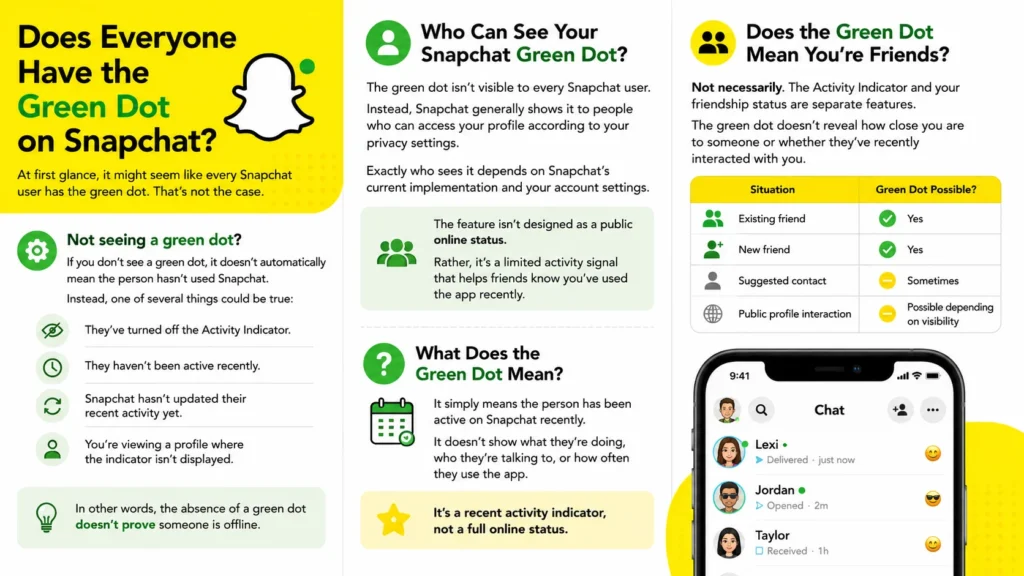
At first glance, it might seem like every Snapchat user has the green dot. That’s not the case.
Whether you see the Snapchat Activity Indicator depends on several factors, including the other person’s privacy settings and your relationship with their account.
If you don’t see a green dot, it doesn’t automatically mean the person hasn’t used Snapchat.
Instead, one of several things could be true:
- They’ve turned off the Activity Indicator.
- They haven’t been active recently.
- Snapchat hasn’t updated their recent activity yet.
- You’re viewing a profile where the indicator isn’t displayed.
In other words, the absence of a green dot doesn’t prove someone is offline.
Who Can See Your Snapchat Green Dot?
The green dot isn’t visible to every Snapchat user.
Instead, Snapchat generally shows it to people who can access your profile according to your privacy settings.
Exactly who sees it depends on Snapchat’s current implementation and your account settings.
The feature isn’t designed as a public online status.
Rather, it’s a limited activity signal that helps friends know you’ve used the app recently.
Does the Green Dot Mean You’re Friends?
Not necessarily.
Many people assume that seeing the green dot means someone accepted their friend request.
That’s a myth.
The Activity Indicator and your friendship status are separate features.
For example:
| Situation | Green Dot Possible? |
|---|---|
| Existing friend | Yes |
| New friend | Yes |
| Suggested contact | Sometimes |
| Public profile interaction | Possible depending on visibility |
The green dot doesn’t reveal how close you are to someone or whether they’ve recently interacted with you.
Can You Turn Off the Green Dot on Snapchat?
Yes.
Snapchat allows users to disable the Activity Indicator if they prefer more privacy.
Many users choose to hide it because they don’t want others assuming they’re available to chat whenever they open the app.
Fortunately, changing this setting only takes a minute.
How to Turn Off the Green Dot on Snapchat
If you don’t want others seeing your recent activity indicator, follow these steps.
- Open Snapchat.
- Tap your Bitmoji or profile icon.
- Tap the Settings icon.
- Scroll to the Privacy Controls section.
- Find Activity Indicator.
- Toggle the feature Off.
After disabling it, other users should no longer see your Activity Indicator.
Keep in mind that Snapchat occasionally reorganizes its settings menu after updates.
If you don’t immediately see the option, look under privacy-related settings.
What Happens After You Disable It?
Turning off the Activity Indicator doesn’t affect your ability to:
- Send Snaps
- Receive chats
- Watch Stories
- Keep Snapstreaks
- Use Discover
- Browse Spotlight
- Share Memories
It only changes whether others can see your recent activity status.
Everything else works normally.
Can You Hide the Green Dot on Snapchat Without Turning Off Other Features?
Yes.
That’s one advantage of the Activity Indicator.
Unlike some messaging platforms that tie multiple privacy settings together, Snapchat lets you disable this feature without affecting most of the app.
For example, turning off the green dot won’t:
- Delete your account
- Disable notifications
- Turn off Snap Map
- Remove your Bitmoji
- Hide your Stories automatically
- Affect your chats
Each privacy setting works independently.
That gives you more control over what other people can see.
Why Is the Green Dot Always Showing on Snapchat?
Some users notice the green indicator appears almost every time they check a friend’s profile.
That can make it seem like the person is constantly online.
Usually, that’s not what’s happening.
Several explanations are more likely.
They Use Snapchat Frequently
Some people open Snapchat dozens of times throughout the day.
They might:
- Reply to chats
- Watch Stories
- Send Snaps
- Browse Spotlight
- Check notifications
Because they’re active so often, the Activity Indicator may appear almost continuously.
The Indicator Reflects Recent Activity
Remember, Snapchat doesn’t display a live online status.
Instead, it highlights recent activity.
If someone checks Snapchat every hour, the green dot may seem permanent.
In reality, it’s updating after each new session.
Snapchat Refreshes Activity Automatically
The app updates profile information behind the scenes.
Because of this, the Activity Indicator can remain visible even after someone closes Snapchat.
That’s expected behavior.
Why Isn’t the Green Dot Showing on Snapchat?
Sometimes users expect to see the indicator but don’t.
Several reasons could explain this.
The User Disabled Activity Indicator
This is the most common reason.
If someone turned off the feature, Snapchat won’t display their green dot.
They Haven’t Used Snapchat Recently
The indicator represents recent activity.
If someone hasn’t opened Snapchat for a while, it may disappear.
You’re Experiencing a Temporary App Issue
Occasionally, Snapchat experiences small synchronization delays.
If profile information doesn’t update immediately, restarting the app often helps.
Your App Needs Updating
Older versions of Snapchat sometimes behave differently.
Installing the latest version ensures you’re seeing the newest features and interface.
Common Myths About the Snapchat Green Dot
The green dot has created plenty of confusion.
Let’s separate fact from fiction.
| Myth | Reality |
|---|---|
| It means someone is online right now. | False. It indicates recent activity. |
| It means they’re reading my message. | False. They may not have opened your chat. |
| It tells you exactly when someone was active. | False. Snapchat doesn’t reveal precise timestamps. |
| You can’t turn it off. | False. Users can disable the Activity Indicator. |
| Everyone has a green dot. | False. Visibility depends on settings and activity. |
| The green dot tracks your phone constantly. | False. It only reflects Snapchat activity. |
Believing these myths often leads to misunderstandings.
Knowing how the feature actually works makes Snapchat much less confusing.
Snapchat Green Dot vs Online Status
People often compare Snapchat with apps like Messenger, WhatsApp, Telegram, and Discord.
While they all help people communicate, their presence indicators work differently.
Here’s a quick comparison.
| Feature | Snapchat | Traditional Online Status |
|---|---|---|
| Shows current online presence | No | Yes |
| Displays recent activity | Yes | Sometimes |
| Shows exact last seen | No | Often |
| User can disable indicator | Yes | Usually |
| Designed for privacy | Strong emphasis | Varies by platform |
Snapchat intentionally avoids revealing too much information about user activity.
That’s consistent with the platform’s overall privacy philosophy.
Does the Green Dot Affect Snapchat Privacy?
Privacy has always been a major part of Snapchat.
That’s one reason the Activity Indicator provides only limited information.
Instead of exposing detailed activity logs, Snapchat keeps things intentionally vague.
The green dot doesn’t reveal:
- The exact time someone opened the app
- Who they’re chatting with
- Which Stories they’re viewing
- Whether they’re typing
- Whether they’re ignoring your message
- How long they’ve been online
That’s a significant difference compared to apps that display precise “Last Seen” timestamps.
Privacy Settings That Work Alongside the Green Dot
The Activity Indicator is only one piece of Snapchat’s privacy controls.
You can also manage:
- Story visibility
- Friend requests
- Contact permissions
- Snap Map location sharing
- Message notifications
- Camera permissions
- Memories backup options
Together, these settings give users substantial control over their account visibility.
Does the Green Dot Work the Same on Android and iPhone?
Yes.
Whether you use Snapchat on Android or iPhone, the Activity Indicator works the same way.
The interface may look slightly different because each operating system has its own design language.
However, the green dot’s purpose remains unchanged.
Regardless of device, it still indicates:
- Recent Snapchat activity
- General user presence
- No real-time online confirmation
The settings for enabling or disabling the Activity Indicator are also nearly identical across platforms.
Troubleshooting Snapchat Activity Indicator Issues
If the green dot isn’t behaving as expected, a few simple fixes often solve the problem.
Restart Snapchat
Close the app completely.
Open it again and allow it to refresh.
Minor display issues often disappear after a restart.
Update the App
Running an outdated version can lead to missing features or inconsistent indicators.
Install the newest version available for your device.
Check Your Privacy Settings
If your own Activity Indicator isn’t appearing, verify that it’s enabled in your Privacy Controls.
Likewise, remember that another user’s settings determine whether you can see their indicator.
Restart Your Phone
Although simple, restarting your device refreshes background processes that may interfere with Snapchat.
Clear Snapchat Cache
If the app feels sluggish or displays outdated information, clearing the cache can improve performance without deleting your conversations or Memories.
These troubleshooting steps solve most Activity Indicator issues without requiring additional support.
Quick Summary: Snapchat Green Dot Explained
If you only remember a few things from this guide, make them these.
| Question | Answer |
|---|---|
| What does the green dot on Snap mean? | The user was recently active on Snapchat. |
| Does it mean someone is online? | No. |
| Does it show exact last active time? | No. |
| Can you hide it? | Yes. |
| Does it show message activity? | No. |
| Is it a live online tracker? | No. |
| Is it part of Snapchat’s privacy features? | Yes. |
Tips for Using Snapchat’s Activity Indicator Wisely
The green dot is helpful, but it shouldn’t become something you overanalyze.
Keep these practical tips in mind.
Don’t Assume Someone Is Ignoring You
A green dot doesn’t mean the person has seen your message.
They could be:
- Watching Stories
- Browsing Spotlight
- Looking through Memories
- Opening the camera
- Checking notifications
Avoid jumping to conclusions based on a single indicator.
Respect Privacy
Snapchat intentionally limits activity information.
That’s one reason many people enjoy using the platform.
Respecting those privacy choices helps create better conversations and fewer misunderstandings.
Keep Your Privacy Settings Updated
Review your privacy settings occasionally.
Snapchat adds new features and updates existing ones regularly.
Checking your settings every few months helps ensure they still match your preferences.
Don’t Rely on the Green Dot for Important Communication
If you need an urgent response, the Activity Indicator isn’t enough.
Someone may have:
- Closed the app
- Put their phone away
- Disabled notifications
- Enabled Do Not Disturb
The green dot only provides context, not certainty.
Frequently Asked Questions
The Snapchat Activity Indicator is one of the platform’s most misunderstood features. Below are clear answers to the questions users ask most often.
What Does the Green Dot on Snap Mean?
The green dot on Snap means the user has been active on Snapchat recently. It does not confirm they’re currently online or using the app at that exact moment.
Instead, Snapchat uses the green dot as a presence indicator that provides a general idea of recent activity while protecting user privacy.
What Does the Green Dot on Snapchat Mean Next to Someone’s Profile?
When you see a green dot next to someone’s profile or Bitmoji, Snapchat is indicating that the person has used the app recently.
It doesn’t tell you:
- When they opened Snapchat
- How long they stayed online
- Whether they’re chatting
- Whether they’ve seen your message
It’s simply a recent activity signal.
Does the Green Dot Mean Someone Is Online?
No.
This is the biggest misconception about Snapchat.
The green dot does not mean someone is online right now.
Someone could have:
- Opened Snapchat a few minutes ago
- Closed the app
- Still displayed the Activity Indicator afterward
Think of it as “recently active” rather than “currently online.”
How Accurate Is the Snapchat Green Dot?
The indicator is accurate for showing recent app activity, but it isn’t designed for real-time tracking.
Because Snapchat intentionally limits activity details, you shouldn’t use the green dot to determine whether someone is:
- Ignoring your messages
- Actively chatting
- Looking at your profile
- Waiting for a reply
The feature simply isn’t built for that purpose.
How Long Does the Green Dot Stay on Snapchat?
Snapchat hasn’t shared an official timeframe.
The green dot generally remains visible for a period after recent activity, but the exact duration isn’t publicly documented.
It may vary depending on:
- App updates
- Recent activity
- Snapchat’s internal systems
- Privacy settings
Can You Turn Off the Green Dot on Snapchat?
Yes.
You can disable the Activity Indicator through Snapchat’s Privacy Controls.
Once disabled, other users shouldn’t see your recent activity indicator.
The setting doesn’t affect your ability to:
- Send Snaps
- Receive messages
- Watch Stories
- Use Spotlight
- Maintain Snapstreaks
Why Can’t I See Someone’s Green Dot?
Several reasons may explain it.
The person may have:
- Turned off their Activity Indicator
- Not used Snapchat recently
- Changed their privacy settings
- Experienced a temporary synchronization delay
Not seeing the green dot doesn’t necessarily mean they’re offline.
Does Everyone Have a Green Dot?
No.
The Activity Indicator depends on both recent activity and privacy settings.
Some users choose to hide it entirely.
Others simply haven’t opened Snapchat recently.
Does the Green Dot Mean Someone Read My Message?
No.
The green dot has nothing to do with message status.
If you want to know whether someone viewed your chat or Snap, use Snapchat’s built-in delivery and read indicators instead.
Can You Fake the Green Dot?
No.
Users can’t manually turn the Activity Indicator on whenever they want.
It’s controlled automatically by Snapchat based on recent app activity and account settings.
Is the Green Dot Available on Every Snapchat Version?
Most current versions of Snapchat support the Activity Indicator, although Snapchat occasionally changes features and interface layouts during updates.
Keeping your app updated ensures you have access to the latest functionality.
Final Thoughts
If you’ve been asking, “What does the green dot on Snap mean?”, the answer is much simpler than many rumors suggest.
The Snapchat green dot is an Activity Indicator that lets others know you’ve been active on Snapchat recently. It isn’t a live online status, it doesn’t reveal exactly when you opened the app, and it doesn’t show whether you’re reading someone’s messages.
That’s an important distinction.
Many messaging apps display precise online presence or “last seen” timestamps. Snapchat takes a different approach by sharing only a general indication of recent activity. This balance gives users a way to discover active friends while preserving a greater level of privacy.
If you’d rather not share that information, you can disable the Activity Indicator through your privacy settings without affecting your chats, Stories, Snapstreaks, or other core features.
The next time you notice a green dot on Snapchat, you’ll know exactly what it represents—and just as importantly, what it doesn’t.

Michael Anderson is a content writer specializing in word meanings, definitions and clear explanations of modern terms and phrases.