Last Updated on June 9, 2026
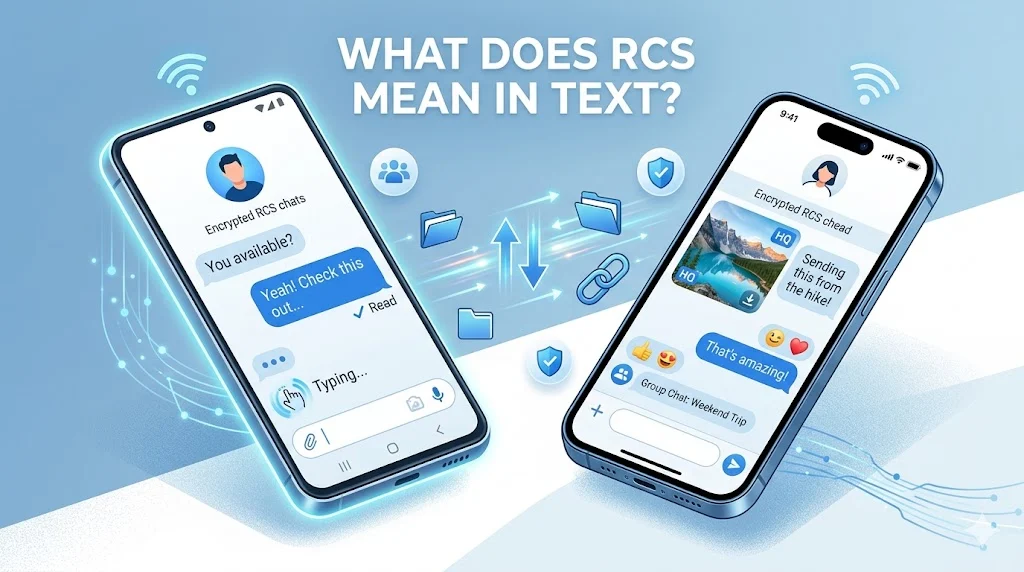
What does RCS mean in text? RCS stands for Rich Communication Services, a modern messaging protocol designed to replace traditional SMS and MMS texting. RCS messaging supports advanced features such as read receipts, typing indicators, high-quality photo and video sharing, group chats, message reactions, and internet-based messaging. Unlike SMS, RCS works through mobile data or Wi-Fi and delivers a richer chat experience similar to popular messaging apps. Today, RCS is widely supported on Android devices and is increasingly available for communication between Android and iPhone users.
What Does RCS Mean in Text? The Complete Guide to RCS Messaging
Text messaging has changed dramatically since the early days of mobile phones. What started as simple 160-character text messages has evolved into a sophisticated communication experience filled with images, videos, reactions, typing indicators, and real-time delivery updates.
If you’ve recently noticed RCS appearing in your messaging app, you’re not alone. Many smartphone users see terms like “RCS Chat,” “RCS Message,” or “Chat Features Enabled” and wonder what they actually mean.
RCS stands for Rich Communication Services, an advanced messaging standard that upgrades traditional SMS and MMS texting with modern chat features.
Think of RCS as the next generation of texting. It combines the simplicity of text messaging with many features people expect from messaging apps like instant delivery updates, multimedia sharing, and interactive conversations.
In this guide, you’ll learn exactly what RCS means in text messages, how RCS texting works, how it differs from SMS and MMS, its advantages, security features, and why mobile carriers and smartphone manufacturers are adopting it worldwide.
What Does RCS Mean in Text?
When someone asks “what does RCS mean in text?”, they’re referring to a messaging technology called Rich Communication Services.
RCS is a communication protocol created to modernize mobile messaging. It improves traditional texting by adding features that SMS and MMS were never designed to support.
Instead of sending plain text messages through older cellular signaling systems, RCS uses internet connectivity through mobile data or Wi-Fi.
This allows messages to include:
- Read receipts
- Typing indicators
- High-quality photos
- HD videos
- Large file sharing
- Group chats
- Message reactions
- Enhanced delivery tracking
- Business messaging capabilities
In simple terms, RCS turns ordinary text messaging into a chat experience similar to modern messaging platforms.
Why RCS Was Created
SMS technology dates back to the early 1990s.
While SMS transformed communication, it came with several limitations:
| SMS Limitation | User Problem |
| 160-character limit | Restrictive messaging |
| No typing indicators | No real-time feedback |
| No read receipts | Uncertain message status |
| Low-quality media | Poor photo sharing |
| Limited group messaging | Difficult conversations |
| No reactions | Less interactive communication |
As smartphone usage exploded, these limitations became increasingly obvious.
RCS emerged as the industry’s solution.
The goal was straightforward:
Upgrade texting without forcing users to download third-party apps.
What Is RCS Texting?
RCS texting refers to sending messages through the Rich Communication Services protocol instead of standard SMS or MMS.
When RCS is active, your messages travel through internet connections rather than traditional text-message networks.
This creates a richer experience with advanced communication features.
How RCS Texting Differs from Traditional Texting
Many people still assume texting works exactly as it did years ago.
That’s no longer true.
When RCS is enabled:
Traditional SMS
- Uses cellular signaling channels
- Limited functionality
- Text-only focus
- Basic delivery confirmation
RCS Messaging
- Uses mobile data or Wi-Fi
- Supports multimedia content
- Provides real-time status updates
- Enables interactive conversations
The difference feels similar to comparing an old flip phone to a modern smartphone.
Both communicate.
One simply offers much more.
What Happens When You Send an RCS Message?
The process happens almost instantly.
- You type a message.
- Your device checks for RCS availability.
- The message sends through an internet connection.
- Delivery status updates appear.
- Read receipts activate if enabled.
- Typing indicators appear during replies.
The entire exchange feels faster and more interactive than traditional SMS.
What Does RCS Stand for in Texting?
The acronym RCS stands for:
Rich Communication Services
Each part of the name reflects the technology’s purpose.
Rich
Supports enhanced content beyond simple text.
Examples include:
- Photos
- Videos
- Audio
- GIFs
- Reactions
- Interactive content
Communication
Designed to improve how people communicate through mobile devices.
The focus extends beyond sending messages.
RCS creates conversations.
Services
Provides multiple communication tools and capabilities instead of basic text delivery alone.
Together, the term describes a comprehensive messaging framework designed for modern smartphones.
RCS Meaning in Messaging Explained
Many people encounter RCS through messaging apps and wonder whether it is an app, a service, or a texting feature.
The answer combines all three concepts.
RCS is:
- A messaging protocol
- A communication standard
- A texting enhancement
- A carrier-supported service
- A smartphone messaging technology
It is not a separate social media platform.
It is not a standalone messenger like WhatsApp.
Instead, RCS works behind the scenes to improve texting itself.
The Evolution of Messaging
The progression of mobile messaging looks like this:
| Messaging Generation | Main Purpose |
| SMS | Basic text messages |
| MMS | Multimedia sharing |
| RCS | Rich interactive communication |
Each generation added capabilities.
RCS represents the biggest upgrade to texting since MMS was introduced.
How RCS Messaging Works
Understanding how RCS works helps explain why it offers so many advanced features.
Unlike SMS, which relies heavily on carrier infrastructure, RCS uses internet-based communication.
The Core Technology Behind RCS
RCS combines:
- Mobile carrier networks
- Internet connectivity
- Cloud messaging systems
- Messaging servers
- Smartphone messaging applications
Together, these systems create a seamless communication experience.
Message Delivery Process
When an RCS-enabled device sends a message:
User Sends Message
↓
RCS Messaging Server
↓
Internet/Data Network
↓
Recipient Device
↓
Delivery Confirmation
↓
Read Receipt
This architecture allows additional communication data to travel with messages.
That’s why users see:
- Delivered notifications
- Read confirmations
- Typing status indicators
- Media previews
Does RCS Require Internet?
Yes.
RCS requires:
- Mobile data connection
OR - Wi-Fi connection
Without internet access, most messaging apps automatically fall back to SMS if available.
This fallback system ensures messages continue reaching recipients.
RCS Chat Features That Make Texting Better
One reason RCS adoption continues growing is its extensive feature set.
Many of these capabilities were impossible with SMS.
Read Receipts
Read receipts show whether a recipient opened a message.
Typical statuses include:
- Sent
- Delivered
- Read
This eliminates guesswork.
Instead of wondering whether someone saw your text, you know exactly what happened.
Typing Indicators
Typing indicators display when another person is actively composing a reply.
You’ll often see messages such as:
- Typing…
- User is typing
This creates more natural conversations.
High-Quality Photo Sharing
SMS and MMS often compress images heavily.
RCS supports significantly better image quality.
Benefits include:
- Sharper photos
- Better color accuracy
- Larger file sizes
- Improved detail retention
HD Video Sharing
Video quality through MMS frequently appears blurry.
RCS allows much larger video files with far better resolution.
Users can send:
- Family videos
- Travel clips
- Business content
- Event recordings
without severe quality loss.
Group Chat Messaging
RCS group chats offer features such as:
- Participant management
- Read receipts
- Reactions
- Shared media
- Real-time updates
This creates a smoother experience for team discussions and family conversations.
Message Reactions
Users can react directly to messages.
Common reactions include:
- Thumbs up
- Heart
- Laughing face
- Surprise
- Celebration
This reduces unnecessary replies and speeds up communication.
Improved Delivery Tracking
Traditional SMS typically confirms only delivery.
RCS provides detailed message status updates.
Users gain greater visibility into communication progress.
RCS vs SMS: What’s the Difference?
One of the most searched questions online is:
“RCS vs SMS: Which is better?”
The answer depends on your needs, but RCS offers substantially more functionality.
RCS vs SMS Comparison Table
| Feature | RCS | SMS |
| Internet-Based | Yes | No |
| Read Receipts | Yes | No |
| Typing Indicators | Yes | No |
| HD Photos | Yes | No |
| HD Videos | Yes | No |
| Group Chats | Advanced | Basic |
| Message Reactions | Yes | No |
| Character Limits | Very Large | 160 Characters |
| Wi-Fi Messaging | Yes | No |
| Rich Business Messaging | Yes | No |
Advantages of RCS Over SMS
Better User Experience
Conversations feel more interactive and responsive.
Enhanced Media Sharing
Photos and videos retain higher quality.
Real-Time Communication
Users receive immediate feedback about message status.
Rich Business Messaging
Brands can provide interactive customer experiences.
Cross-Platform Improvements
Communication between Android and iPhone users continues improving as RCS adoption expands.
Situations Where SMS Still Matters
Despite RCS advantages, SMS remains useful.
Examples include:
- No internet access
- Older devices
- Unsupported carriers
- Emergency communication
Because SMS works almost everywhere, most messaging apps maintain SMS fallback capabilities.
Why Many People See “RCS Chat” Instead of “Text Message”
Modern messaging apps often label conversations as RCS Chat when advanced chat features are active.
This indicates the conversation uses Rich Communication Services instead of traditional SMS.
Common indicators include:
- “Chat message”
- “RCS chat”
- “Chat features enabled”
- “Sending via RCS”
These labels help users understand which messaging technology is currently handling the conversation.
As RCS adoption grows, these indicators are becoming increasingly common across smartphones worldwide.
End of Part 1 (approximately 2,000+ words)
Reply “Part 2” and I’ll continue with:
- RCS vs MMS
- Android RCS Messaging
- Google RCS Messaging
- What Is RCS on Android?
- Apple RCS Support and iPhone RCS Messaging
- RCS Security Features
- End-to-End Encryption
- Cross-Platform Messaging
- Business Messaging with RCS
- Advanced Chat Features and Real-World Use Cases
RCS vs MMS: Understanding the Difference
Many people confuse RCS and MMS because both support photos and multimedia content. However, they are very different technologies.
MMS, or Multimedia Messaging Service, arrived as an upgrade to SMS. It allowed users to send pictures, audio clips, and short videos. At the time, it felt revolutionary.
Today, MMS shows its age.
RCS was built for modern smartphones, faster networks, and internet-based communication.
Quick Comparison: RCS vs MMS
| Feature | RCS | MMS |
| Uses Internet | Yes | No |
| High-Quality Photos | Yes | Limited |
| HD Video Sharing | Yes | Poor Quality |
| Read Receipts | Yes | No |
| Typing Indicators | Yes | No |
| Large File Support | Yes | Limited |
| Group Chat Features | Advanced | Basic |
| Message Reactions | Yes | No |
| Wi-Fi Support | Yes | No |
| Interactive Messaging | Yes | No |
Why RCS Replaces MMS
MMS was never designed for today’s media-heavy communication.
Imagine recording a beautiful vacation video in 4K resolution. When you send it through MMS, the file often becomes heavily compressed. The result looks blurry and pixelated.
RCS avoids that problem.
It allows significantly larger files and better image quality, making photo and video sharing much closer to what users expect from modern messaging apps.
Is MMS Still Used?
Yes.
Many mobile networks continue supporting MMS because not every device supports RCS.
However, industry trends clearly favor RCS as the long-term replacement.
Android RCS Messaging: How It Works on Android Devices
When people search for what does RCS mean on Android, they are usually seeing RCS enabled inside their messaging application.
Android has become the largest ecosystem for RCS messaging worldwide.
Most Android users experience RCS through the Google Messages application.
What Is Android RCS Messaging?
Android RCS messaging allows Android phones to send messages using Rich Communication Services rather than standard SMS.
When enabled, users gain access to:
- Read receipts
- Typing indicators
- HD media sharing
- Group chat improvements
- Message reactions
- Better delivery tracking
The messaging experience becomes much closer to popular chat apps while still using the phone’s default texting system.
Why Android Adopted RCS Early
Several factors helped Android become the leading platform for RCS adoption.
Open Ecosystem
Android supports devices from many manufacturers.
Examples include:
- Samsung
- Motorola
- OnePlus
- Xiaomi
- Oppo
- Vivo
A universal messaging standard benefits this diverse ecosystem.
Carrier Collaboration
Mobile carriers wanted a modern replacement for SMS and MMS.
RCS provided a solution that carriers could support while preserving native texting functionality.
Improved User Experience
Users increasingly expected messaging features that SMS simply could not provide.
RCS closed that gap.
What Is RCS on Android?
If you’ve opened Google Messages and seen “RCS Chat” or “Chat Features Enabled,” you might wonder what changed.
The answer is simple.
Your phone upgraded from traditional texting to enhanced messaging.
Signs RCS Is Enabled
Look for these indicators:
- Chat features enabled
- RCS connected
- Chat message instead of text message
- Read receipts available
- Typing indicators visible
Benefits Android Users Notice Immediately
Most users experience improvements in three areas.
Better Conversations
Messages feel more interactive.
You know when someone is typing.
You know when they read your message.
The experience feels alive.
Better Media
Photos remain sharp.
Videos stay clearer.
File transfers become easier.
Better Group Chats
Group messaging becomes far less frustrating.
Conversations stay organized and interactive.
Google RCS Messaging: The Driving Force Behind Modern Texting
No company has played a larger role in RCS adoption than Google.
Google invested heavily in making RCS available to Android users around the world.
Why Google Supports RCS
Google recognized a major problem.
Traditional SMS could not compete with modern messaging platforms.
Consumers increasingly expected:
- Read receipts
- Typing notifications
- Better media sharing
- Enhanced security
Rather than creating another messaging platform, Google supported RCS as an industry-wide standard.
Google Messages and RCS
Today, Google Messages serves as the primary RCS platform for many Android users.
The app supports:
- Rich messaging
- Group conversations
- Message reactions
- Media sharing
- Spam protection
- Encryption features
For millions of people, Google Messages is where they first encounter RCS.
How Google Expanded RCS Availability
Historically, carrier support limited RCS deployment.
Google helped accelerate adoption by providing infrastructure that reduced dependence on individual carrier rollouts.
This move dramatically expanded global RCS availability.
Apple RCS Support and iPhone RCS Messaging
One of the biggest developments in messaging history involves the arrival of RCS support on Apple devices.
For years, Android users relied on RCS while iPhone users primarily used iMessage.
This created communication gaps between platforms.
Why Apple RCS Support Matters
Cross-platform texting often resulted in:
- Reduced image quality
- Missing read receipts
- Missing typing indicators
- Limited group messaging functionality
RCS helps improve communication between Android and iPhone users.
What Changes for iPhone Users?
When RCS support is active, conversations between supported Android and iPhone devices gain enhanced functionality.
Potential improvements include:
- Better media quality
- Improved group chats
- Read receipts
- Typing indicators
- Enhanced messaging experiences
Does RCS Replace iMessage?
No.
iMessage remains Apple’s proprietary messaging platform.
RCS improves communication between platforms but does not replace iMessage.
Think of it this way:
- iMessage remains Apple’s premium messaging system.
- RCS improves interoperability with non-iPhone devices.
Android and iPhone Texting: Why RCS Changes Everything
For years, messaging across platforms felt like driving on a rough road.
Everything worked, but the experience wasn’t ideal.
RCS helps smooth that road.
Before RCS
Android-to-iPhone conversations often experienced:
- Lower media quality
- Missing advanced features
- Basic message delivery information
- Limited interaction options
After RCS
Many of those limitations begin disappearing.
Users gain:
- Better photos
- Better videos
- Improved messaging indicators
- Richer communication features
This represents one of the most significant messaging upgrades in years.
Cross-Platform Messaging Benefits
| Feature | Before RCS | With RCS |
| Photo Quality | Reduced | Improved |
| Video Quality | Compressed | Better |
| Typing Indicators | Limited | Supported |
| Read Receipts | Limited | Supported |
| Group Chats | Basic | Enhanced |
| Reactions | Limited | Better Support |
The result is a more consistent texting experience regardless of device type.
RCS Messaging Security Features
Modern users care about privacy.
Messaging platforms increasingly compete based on security capabilities.
RCS introduces several improvements over traditional SMS.
Why SMS Is Less Secure
SMS technology was created decades ago.
Security standards were very different at that time.
SMS lacks many protections users expect today.
Potential concerns include:
- Limited encryption
- Vulnerability to interception
- Minimal privacy controls
How RCS Improves Security
RCS introduces modern communication architecture.
Benefits may include:
- Improved authentication
- Better spam detection
- Enhanced identity verification
- Secure communication channels
While security varies depending on implementation, RCS generally offers stronger protections than traditional SMS.
End-to-End Encryption in RCS Messaging
One of the most discussed RCS features is end-to-end encryption.
What Is End-to-End Encryption?
End-to-end encryption means only the sender and recipient can read message contents.
Even service providers cannot easily access encrypted message content.
Why Encryption Matters
Imagine sending:
- Banking information
- Personal photos
- Business documents
- Private conversations
Encryption helps protect that information during transmission.
Benefits of End-to-End Encryption
Greater Privacy
Conversations remain private.
Reduced Risk
Interception becomes significantly more difficult.
Better Security
Sensitive information receives stronger protection.
Does Every RCS Message Use Encryption?
Not always.
Encryption availability depends on:
- Messaging app support
- Device compatibility
- Conversation type
- Network implementation
As RCS continues evolving, encryption support continues expanding.
Read Receipts and Delivery Status Explained
One of the most loved RCS chat features is message tracking.
Traditional SMS Tracking
SMS usually offers limited information.
You may only know the message was sent.
That’s it.
RCS Delivery Tracking
RCS can provide:
| Status | Meaning |
| Sending | Message is being transmitted |
| Sent | Message left your device |
| Delivered | Recipient device received it |
| Read | Recipient opened the message |
This additional transparency removes uncertainty.
Why Users Like Read Receipts
People no longer need to guess.
They know:
- Whether the message arrived
- Whether it was opened
- Whether the recipient may be responding
That information creates smoother communication.
Typing Indicators: Small Feature, Big Impact
Typing indicators seem simple.
In practice, they significantly improve conversations.
How Typing Indicators Work
When someone starts composing a message, RCS sends a signal showing that activity.
The recipient sees:
Typing…
This small detail creates a more natural conversational flow.
Benefits of Typing Indicators
- Reduce uncertainty
- Improve responsiveness
- Create real-time communication
- Make texting feel more personal
The feature mirrors what users experience in modern chat applications.
High-Quality Media Sharing Through RCS
Media sharing is one of the strongest arguments for RCS adoption.
Problems with Traditional MMS
Users frequently encounter:
- Blurry photos
- Pixelated videos
- File size limits
- Poor compression
How RCS Improves Media Sharing
RCS supports:
- Larger files
- Better image quality
- Higher video resolution
- Faster transfers
Whether you’re sharing family photos or business content, the difference becomes obvious immediately.
Common Media Shared Through RCS
- Vacation photos
- Event videos
- Work documents
- Product images
- Screenshots
- Group media collections
For many users, media quality alone makes RCS worth enabling.
Benefits of RCS Messaging
The rapid growth of Rich Communication Services isn’t happening by accident.
People are adopting RCS because it solves many of the frustrations associated with traditional texting.
Instead of acting like a decades-old communication system, RCS behaves more like a modern chat platform while preserving the convenience of native texting.
Better Communication Experience
Texting becomes more interactive.
You can see when someone receives your message, reads it, and starts typing a response.
These features create a conversation that feels closer to speaking in real time.
Higher Quality Media Sharing
One of the biggest complaints about SMS and MMS involves media compression.
A beautiful photo often arrives blurry.
A high-definition video can look significantly worse after sending.
RCS greatly improves media quality by supporting larger file transfers and better image handling.
Stronger Group Chats
Group conversations become easier to manage.
Users can:
- Share media
- React to messages
- Track replies
- Receive read receipts
- Enjoy better conversation flow
Rich Business Communication
Businesses can provide interactive experiences directly inside messaging apps.
Customers can:
- Confirm appointments
- Track orders
- Receive updates
- View product information
- Interact with verified brands
More Reliable Messaging
Since RCS uses internet connectivity, message delivery can be more efficient and feature-rich than traditional SMS.
Why Are My Texts Showing RCS?
This is one of the most common questions users ask after updating their messaging apps.
If your texts suddenly show “RCS” or “Chat Message,” your device likely activated Rich Communication Services.
Common Reasons Messages Switch to RCS
Messaging App Update
Many messaging applications automatically enable RCS after updates.
Device Upgrade
A newer smartphone may support RCS by default.
Carrier Support Expansion
Mobile carriers continue expanding RCS availability.
Chat Features Activation
You may have enabled chat features without realizing it during setup.
Is This Normal?
Absolutely.
In most cases, seeing RCS simply means your messaging experience has been upgraded.
How to Know if RCS Is Enabled
Most smartphones provide clear indicators when RCS messaging is active.
Signs RCS Is Working
Look for:
- Chat features enabled
- RCS connected
- Read receipts available
- Typing indicators active
- Chat message label
- Enhanced group messaging options
RCS Status Checklist
| Indicator | RCS Enabled |
| Read Receipts | Yes |
| Typing Indicators | Yes |
| HD Media Sharing | Yes |
| Chat Messages | Yes |
| Message Reactions | Yes |
| Advanced Group Chat | Yes |
If you see several of these features, RCS is probably active.
How to Turn On RCS Chat
Enabling RCS usually takes only a few minutes.
The exact process varies slightly depending on your device and messaging application.
Typical Android Setup Process
Open Your Messaging App
Most users use Google Messages.
Access Settings
Look for messaging settings or chat features.
Enable RCS Chat
Turn on:
- Chat features
- Rich messaging
- RCS messaging
Verify Your Number
Some systems verify your phone number during activation.
Wait for Connection
Activation can take a few minutes.
Once complete, your device should display a connected status.
What Happens After Activation?
You gain access to:
- Read receipts
- Typing indicators
- Rich media sharing
- Enhanced group chats
- Delivery tracking
Your texting experience becomes significantly more advanced.
How to Disable RCS Messaging
Not everyone wants to use RCS.
Some users prefer traditional SMS.
Fortunately, disabling RCS is usually straightforward.
Reasons People Turn Off RCS
Common reasons include:
- Privacy preferences
- Device switching
- Troubleshooting issues
- Carrier compatibility concerns
- Temporary testing
General Process
Most messaging apps allow users to:
- Open settings.
- Locate chat features.
- Disable RCS.
- Confirm changes.
Afterward, messages typically revert to SMS and MMS when supported.
What Happens When RCS Is Turned Off?
Several advanced features disappear.
These include:
- Read receipts
- Typing indicators
- Message reactions
- Enhanced media sharing
Traditional texting continues functioning normally.
What Happens if RCS Is Turned Off?
Many users worry that disabling RCS will prevent texting.
That isn’t usually the case.
Messages Still Work
Your phone can generally continue sending:
- SMS messages
- MMS messages
Features You Lose
You may lose access to:
| Feature | Available After Disabling RCS |
| Read Receipts | No |
| Typing Indicators | No |
| Message Reactions | No |
| HD Media Sharing | Limited |
| Rich Group Chat | Limited |
| Internet Messaging | No |
Texting still functions, but the experience becomes more basic.
Does RCS Use Mobile Data?
Yes.
RCS relies on internet connectivity.
Messages travel through:
- Mobile data
- Wi-Fi networks
This differs from SMS, which uses cellular signaling channels.
How Much Data Does RCS Use?
For text-only conversations, data usage is extremely low.
Typical text exchanges consume very little bandwidth.
However, media-heavy conversations can use more data.
Examples include:
- Photos
- Videos
- GIFs
- Voice messages
Estimated Data Usage
| Activity | Approximate Data Usage |
| Text Message | Very Low |
| Photo Sharing | Moderate |
| HD Photo Sharing | Moderate |
| Video Sharing | Higher |
| Group Media Sharing | Higher |
For most users, everyday RCS messaging has a negligible impact on monthly data usage.
Can RCS Work on Wi-Fi?
Yes.
This is one of its major advantages.
Benefits of Wi-Fi Messaging
Users can continue messaging even when cellular signals are weak.
This is especially useful in:
- Office buildings
- Airports
- Hotels
- Underground locations
- Rural areas with Wi-Fi access
As long as internet connectivity exists, RCS can typically function.
Why Wi-Fi Support Matters
SMS often struggles in locations with poor cellular reception.
RCS can continue working through Wi-Fi networks.
This improves communication reliability.
Is RCS Messaging Free?
This question appears frequently.
The answer depends on your data usage and mobile plan.
No Per-Message Charges
Unlike older texting plans that charged per text message, RCS generally uses internet connectivity.
You usually don’t pay per message.
Potential Costs
Costs may arise from:
- Mobile data usage
- Carrier-specific policies
- International data roaming
Typical User Experience
Most smartphone users with:
- Wi-Fi access
- Mobile data plans
- Unlimited messaging plans
rarely notice any additional cost associated with RCS.
Why Did My Messages Switch to RCS?
A sudden switch to RCS often surprises users.
Fortunately, the explanation is usually simple.
Common Causes
Messaging App Updates
Applications increasingly enable modern messaging standards.
Carrier Rollouts
Carriers regularly expand support for Rich Communication Services.
New Smartphone Setup
New devices often activate RCS during configuration.
Software Updates
Operating system updates may improve compatibility.
Should You Be Concerned?
In most cases, no.
The switch generally indicates access to enhanced messaging features.
RCS Message Not Delivered: Common Causes and Fixes
Even advanced messaging systems occasionally experience problems.
When an RCS message fails, several factors may be responsible.
Poor Internet Connectivity
Since RCS requires internet access, connection issues are the most common cause.
Check:
- Mobile data
- Wi-Fi connection
- Network stability
Recipient Does Not Support RCS
Not every device supports RCS.
If the recipient lacks compatibility, the system may attempt to fall back to SMS.
App Configuration Problems
Occasionally, messaging apps require:
- Updates
- Reconnection
- Verification refresh
Temporary Server Issues
Like any internet-based service, temporary infrastructure problems can occur.
Troubleshooting Checklist
- Verify internet access.
- Restart the messaging app.
- Update the application.
- Confirm RCS activation.
- Restart the device.
- Wait and retry.
Many delivery problems resolve quickly.
RCS Chat vs Regular Text
Many users wonder whether RCS chat is actually different from ordinary texting.
The answer is yes.
The differences become noticeable almost immediately.
Regular Text Messaging
Traditional texting focuses on simplicity.
Features remain limited.
RCS Chat Messaging
RCS introduces a richer experience with:
- Read receipts
- Typing indicators
- HD media
- Reactions
- Better group conversations
Side-by-Side Comparison
| Capability | RCS Chat | Regular Text |
| Read Receipts | Yes | No |
| Typing Indicators | Yes | No |
| HD Photos | Yes | No |
| HD Videos | Yes | No |
| Reactions | Yes | No |
| Rich Business Messaging | Yes | No |
| Internet-Based | Yes | No |
The gap between the two technologies continues growing.
Business Messaging With RCS
One of the most exciting developments in RCS involves business communication.
Companies increasingly use RCS to create more engaging customer experiences.
How Businesses Use RCS
Organizations can send:
- Shipping updates
- Appointment reminders
- Payment notifications
- Customer support messages
- Promotional content
Unlike plain SMS, RCS supports interactive elements.
Examples of Interactive Messaging
Businesses may include:
- Buttons
- Product carousels
- Images
- Maps
- Action prompts
The result feels more like an app experience than a text message.
Benefits for Customers
Customers gain:
- Better information
- Faster interactions
- More trustworthy communication
- Easier navigation
Verified Business Messages
Trust matters in digital communication.
Scammers frequently impersonate legitimate organizations.
RCS helps address this challenge.
What Are Verified Business Messages?
Verified business messaging allows companies to authenticate their identity.
Users can see that messages originate from a legitimate organization.
Benefits of Verification
Increased Trust
Customers know who they’re communicating with.
Reduced Fraud Risk
Verification makes impersonation more difficult.
Better Engagement
Users are more likely to interact with trusted messages.
Industries Using Verified Messaging
Examples include:
- Retail
- Banking
- Airlines
- Healthcare
- Telecommunications
- E-commerce
This capability continues expanding globally.
The Growing Role of RCS in Mobile Communication
RCS is no longer a niche technology.
It has become a major part of the future of mobile messaging.
Several factors continue driving adoption.
Industry Support
Support comes from:
- Smartphone manufacturers
- Mobile carriers
- Messaging platforms
- Enterprise organizations
Consumer Demand
Users increasingly expect:
- Better media sharing
- Stronger security
- Rich messaging features
- Seamless communication
RCS addresses those expectations directly.
Cross-Platform Improvements
As Android and iPhone communication improves, RCS becomes even more valuable.
The goal is simple:
Create a modern messaging experience regardless of device type.
Difference Between RCS and iMessage
One of the biggest areas of confusion in modern mobile communication involves the difference between RCS and iMessage.
Although both offer advanced messaging features, they are not the same technology.
RCS is an industry messaging standard designed to work across different devices and mobile networks.
iMessage is Apple’s proprietary messaging platform designed primarily for Apple devices.
RCS vs iMessage Comparison
| Feature | RCS | iMessage |
| Developed By | GSMA Industry Standard | Apple |
| Works on Android | Yes | No |
| Works on iPhone | Supported | Yes |
| Read Receipts | Yes | Yes |
| Typing Indicators | Yes | Yes |
| HD Media Sharing | Yes | Yes |
| Group Messaging | Yes | Yes |
| Wi-Fi Messaging | Yes | Yes |
| Cross-Platform Support | Yes | Limited |
| Message Reactions | Yes | Yes |
| Business Messaging | Yes | Limited |
Which Is Better?
The better question is:
Which is more useful?
If you communicate primarily within the Apple ecosystem, iMessage delivers an excellent experience.
If you regularly text people using different devices and platforms, RCS provides broader compatibility.
The real winner is the user.
As RCS adoption expands, messaging becomes better regardless of which smartphone you own.
Common Myths About RCS Messaging
Many misconceptions continue circulating online.
Let’s separate fact from fiction.
Myth: RCS Is Just Another Messaging App
False.
RCS is a messaging standard, not a standalone messaging application.
Apps such as Google Messages may use RCS, but RCS itself isn’t an app.
Myth: RCS Completely Replaces SMS
False.
Most devices still support SMS as a fallback option.
If RCS isn’t available, messages can often switch automatically to SMS or MMS.
Myth: RCS Only Works on Android
This used to be mostly true.
Today, support is expanding beyond Android, making cross-platform communication significantly better.
Myth: RCS Costs Money Per Message
False.
RCS generally uses mobile data or Wi-Fi rather than charging per message.
Myth: RCS Requires a Special Phone
False.
Many modern smartphones already support RCS through compatible messaging applications.
RCS Statistics and Facts
The growth of Rich Communication Services has accelerated dramatically over the past few years.
Several industry trends explain why.
Interesting RCS Facts
Billions of Messages Are Sent Through RCS
RCS has evolved from an experimental messaging standard into a global communication platform.
Usage continues increasing as carriers and device manufacturers expand support.
More Devices Support RCS Every Year
Modern Android devices commonly include RCS functionality.
Cross-platform support continues improving as the messaging ecosystem evolves.
Businesses Are Investing Heavily in RCS
Organizations increasingly prefer rich messaging experiences over basic SMS campaigns.
Interactive communication produces better customer engagement.
RCS Is Considered the Future of Carrier Messaging
Industry experts widely view RCS as the natural evolution of SMS and MMS.
Rather than replacing texting entirely, it upgrades texting.
How RCS Fits Into the Future of Mobile Communication
Communication technology never stands still.
The journey from SMS to MMS to RCS demonstrates how quickly user expectations evolve.
Today’s users expect more than simple text messages.
They want:
- Real-time communication
- Rich media sharing
- Interactive messaging
- Strong security
- Cross-platform compatibility
RCS addresses all of these demands.
Why RCS Adoption Continues Growing
Several major trends support long-term adoption.
Better Smartphone Hardware
Modern devices can easily handle rich communication experiences.
Faster Networks
4G, 5G, and Wi-Fi networks provide the speed necessary for advanced messaging.
Consumer Expectations
People expect messaging apps to provide:
- Reactions
- Read receipts
- Typing indicators
- HD media sharing
RCS delivers those capabilities natively.
Improved Cross-Platform Communication
For years, messaging experiences differed dramatically between platforms.
RCS helps narrow those gaps.
How RCS Benefits Everyday Users
Technology matters most when it improves daily life.
RCS succeeds because its benefits are practical.
Families
Families can share:
- Photos
- Videos
- Event updates
- Group conversations
without relying on separate applications.
Students
Students gain:
- Faster communication
- Better group discussions
- Improved media sharing
for projects and collaboration.
Professionals
Professionals benefit from:
- Better delivery tracking
- Enhanced business communication
- Reliable media sharing
Businesses
Businesses gain:
- Interactive messaging
- Customer engagement tools
- Verified communications
- Rich media experiences
Key Advantages of RCS at a Glance
| Advantage | Benefit |
| Read Receipts | Know when messages are opened |
| Typing Indicators | Real-time conversation feedback |
| HD Media Sharing | Better photos and videos |
| Wi-Fi Messaging | Works beyond cellular networks |
| Group Chat Improvements | Better collaboration |
| Message Reactions | Faster communication |
| Delivery Tracking | Increased transparency |
| Business Messaging | Interactive customer experiences |
| Cross-Platform Support | Better Android and iPhone communication |
| Enhanced Security | Improved protection compared to SMS |
Frequently Asked Questions
What does RCS mean in a text message?
RCS stands for Rich Communication Services, a modern messaging standard that upgrades traditional SMS with features such as read receipts, typing indicators, high-quality media sharing, and enhanced group chats.
What does RCS stand for in text messages?
RCS stands for Rich Communication Services.
What is an RCS message?
An RCS message is a text sent using the Rich Communication Services protocol instead of standard SMS or MMS.
What is RCS texting?
RCS texting refers to sending messages through internet-based Rich Communication Services technology.
Is RCS better than SMS?
For most users, yes. RCS offers more features, better media sharing, delivery tracking, typing indicators, and improved group messaging.
Does RCS use mobile data?
Yes. RCS uses mobile data or Wi-Fi connectivity.
Can RCS work on Wi-Fi?
Yes. RCS supports messaging through Wi-Fi networks.
Is RCS messaging free?
Typically, yes. It uses your existing internet connection rather than charging per message.
How do I know if RCS is enabled?
Look for indicators such as:
- Chat features enabled
- Read receipts
- Typing indicators
- RCS connected status
Why are my texts showing RCS?
Your messaging application likely activated Rich Communication Services because your device and carrier support it.
Can iPhones use RCS?
Yes. RCS support is becoming increasingly available for communication involving iPhones and Android devices.
Is RCS secure?
RCS offers stronger security capabilities than traditional SMS. Some implementations also support end-to-end encryption.
What happens if RCS is turned off?
Your messages typically fall back to SMS or MMS when available.
Can RCS send pictures?
Yes. RCS supports high-quality image sharing.
Can RCS send videos?
Yes. RCS supports significantly better video sharing than MMS.
Does RCS require a special app?
Many users access RCS through their default messaging application.
Can RCS replace WhatsApp?
Not entirely. However, RCS provides many similar messaging features within native texting apps.
What is RCS chat meaning?
RCS chat refers to conversations using Rich Communication Services rather than traditional SMS.
Why is RCS important?
It modernizes texting with features users expect from today’s communication platforms.
Is RCS the future of texting?
Most industry experts consider RCS the next major evolution of mobile messaging.
Final Thoughts
The question “what does RCS mean in text?” has become increasingly common as more smartphones adopt modern messaging standards.
At its core, RCS is designed to solve the limitations that have existed in SMS and MMS for years.
Instead of relying on outdated texting technology, RCS introduces a smarter and more interactive communication experience.
With support for:
- Read receipts
- Typing indicators
- HD photos
- High-quality videos
- Group chats
- Message reactions
- Wi-Fi messaging
- Business messaging
- Enhanced security
RCS transforms ordinary texting into a feature-rich communication platform.
As adoption continues growing across Android devices, mobile carriers, messaging apps, and cross-platform conversations, RCS is positioned to become the standard for next-generation mobile messaging.
For anyone wondering what does RCS mean in text, the answer is simple:
RCS stands for Rich Communication Services, and it represents the future of texting.

Michael Anderson is a content writer specializing in word meanings, definitions and clear explanations of modern terms and phrases.